Why can’t i connect target to cast to ThirdPersonCharacterMode and how can i change thing so it would be possible to to do so?

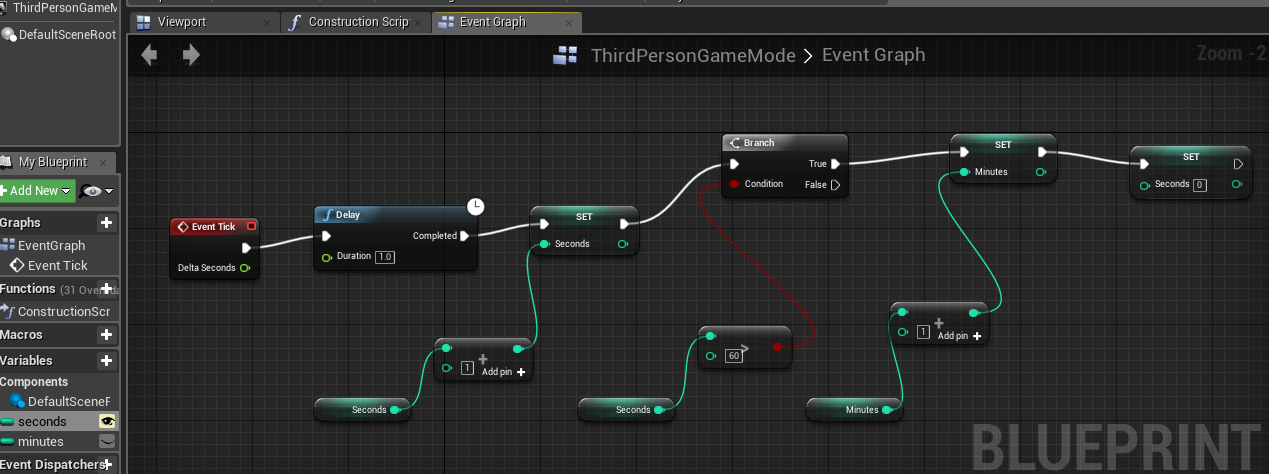
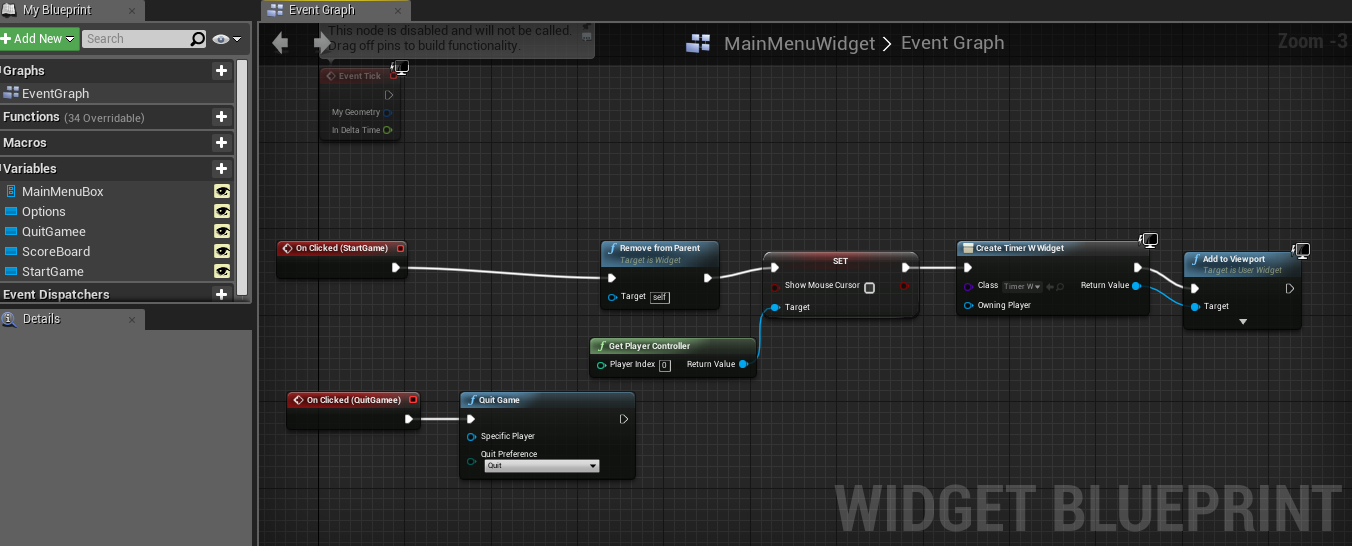
Why can’t i connect target to cast to ThirdPersonCharacterMode and how can i change thing so it would be possible to to do so?
Third Person Game Mode does not seem to have a variable minutes. The nodes and pins in the editor are context sensitive. Whenever possible start placing them by dragging a wire from an object first and only then search for a specific node - this will always provide you with pertinent, compatible and filtered choices. It will also save you a couple of clicks.
What does the warning/error message say when you try to connect those pins?
This is the error. But TheThirdPersonGameMode has a integer variable minutes. I just don’t know what to do to make the timer work.

This is the error. But
TheThirdPersonGameMode has a integer
variable minutes. I just don’t know
what to do to make the timer work.
Can you open the Third Person Game Mode blueprint and check what class it extends from. It is in the very upper right corner → Parent Class: ?
Also try dragging a wire from Third Person Game Mode and then search for minutes, like I mentioned before. Do you see the variable in the list?
Another question, if this is a GameMode you’re supposed be using, are you actually using it? Did you assign it as your custom GameMode. Otherwise, the class is not instantiated and your variable does not exist.
Parent class:Game Mode Base.
And yes it shows on the list when i search for minutes.
And the correct GameMode is assigned.
If it shows on the list when you drag a wire from the the cast node, so what’s the problem, just place it in the graph…

Just don’t tell me that the only issue here is that you forgot to connect the wires in your first pic 
Yes, that seemed to be the problem. Now it’s working. Thank you soo soo much for pointing this out to me 
The timer is working now, but how can i make the timer to start when the StartGame button has been clicked?
But will it work if print text is in development only?
This is an example of how to make a timer that does not do unnecessary stuff every frame and runs at the same speed on any machine. Your timer will run twice as fast if someone has a 120Hz monitor, for example.
You’re right, the debug nodes work in the PIE only. You need to hook it up to your widget, of course. You can actually have this code it the widget and send the text value to the text block that shows the elapsed time.
You can also have this code in the GameMode and update the widget every frame, up to you, really. This is probably a better method if you wish the timer to keep going even though the widget is not present.
Select the text block, flag it as variable (upper right corner of the details panel). Get it from the list → Set Text.
