So… progress. The last part I was having trouble with before packaging this up as an example is now fixed. I was having trouble figuring out how to properly scale the mask area (it was inversely coupled to the scale of the sphere I use to position the mask - making the sphere larger made the mask smaller). This is now fixed and the placement sphere now properly matches the mask edges (though if the mesh is being animated they may not match up, so it’s important to place it while the mesh is in T-pose (just uncheck the anim asset basically).
Also I should mention, and I was confused about this too - the L4D2 wound filling isn’t procedural at all, they actually built out static wound meshes and then selected from among them in order to do the wounds, so they were effectively “pre-broken” as well. I do wish there were a way to procedurally fill the ellipse mask with wound geometry but I’m not aware of a way to do it (without, say, volumetric materials).
Anyway, now that the placement sphere works I’m going to fix up the system so that it’s generic, as right now it only supports one ellipsemask for all materials (just for ease of testing).
One thing I could never figure out is how to add their blood mask to the texture - the white paper says that they use the XY of the ellipse position as a UV for the blood mask, but that wasn’t enough to get it projecting like they had it.
@Chosker or anyone else, if you have any ideas how to correctly blend in the blood mask to the edges of the ellipse mask, I would love that, and it would make it possible to bring the results of this system (or even the pre-break UDK system) up that might higher.
This is the code that gets the per-vertex distance from the ellipse center, which is then used as an input to texkill/clip:
float3 vLocalPosition = (actorpos.xyz - inp.xyz);

float3 vEllipsoidPos;

vEllipsoidPos.x = dot( -right.xyz, vLocalPosition.xyz);
vEllipsoidPos.y = dot( -forward.xyz, vLocalPosition.xyz);
vEllipsoidPos.z = dot( -up.xyz, vLocalPosition.xyz);

float2 ellipseUV = vEllipsoidPos.xy;

return length( vEllipsoidPos.xyz);
Where actorpos is the pre-skinned vertex position (so basically always in T-pose), inp is the ellipse origin position, and right/forward/up are the basis vectors of the ellipse.
ellipseUV is the code from the whitepaper they say is used as the UV coords for the bloodmask texture, which is blended in along the edges of the masked area in order to break up the silhouette.
Edit: Here’s a little (crummy, sorry for messiness) gif of the breaking process in action:
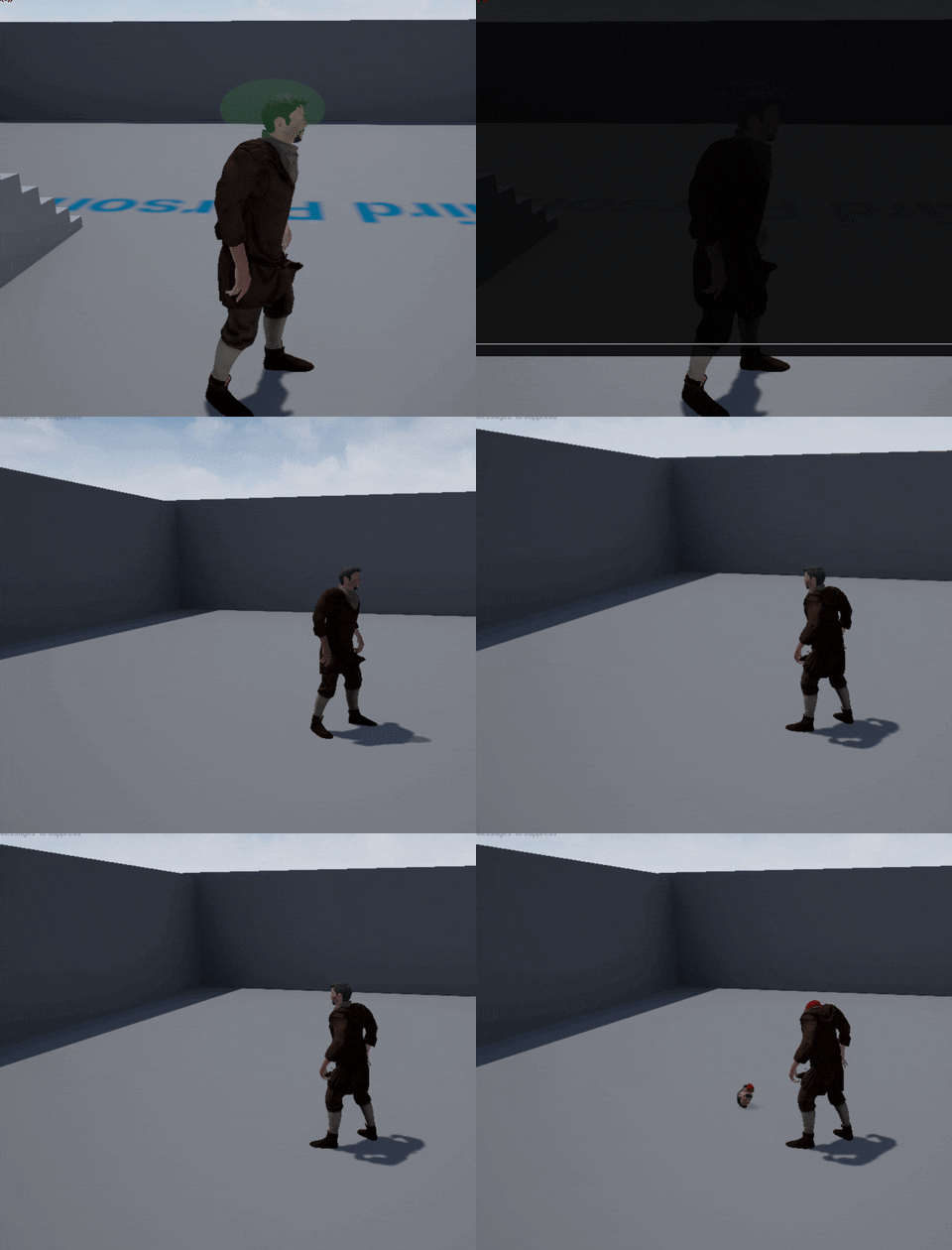
To break that down:
I’ve got a sphere that determines where the mask is placed. The character has two skeletal meshes. The normal one, and the proxy one. The proxy one has the same materials but inverted, so that anything hidden by the ellipse on the base mesh will be visible on the proxy mesh (e.g., the head in this example). The proxy mesh has a secondary physics asset in which the root body is positioned/scaled for the head.
When I break the mesh, I set the proxy to simulate physics (the whole thing, rather than “all bodies below”) and unhide the cap meshes.