Does anyone know how to change the colour of the campfire’s flame?
I’ve been digging though the blueprints for a while now and I can’t seem to find where to change the flame colour… 
Please assist. Thanks. 
Does anyone know how to change the colour of the campfire’s flame?
I’ve been digging though the blueprints for a while now and I can’t seem to find where to change the flame colour…
Please assist. Thanks.
Look through the emitter settings, just search for “campfire” and open the particle system.
-WM
I’ve been looking at both “Campfire” and “P_Campfire” Particle System files and the only colours i’ve found that i can change are “Module Editor Color”… I clicked everything i could (in each file) and scrolled through the details tab for each item clicked… no luck… Did i just overlook it somewhere?
Just campfire, no prefix.
Color Over Life; X = R, Y = G, Z = B(presumably, anyway).
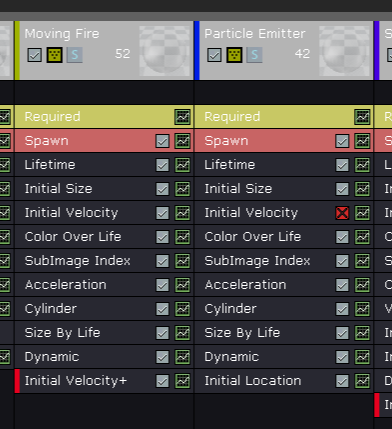
Both emitters are responsible for the fire, allows for some unique effects like this(if you’ve ever seen multi-coloured flames anywhere before, you’ll know what I mean).
-WM
Just campfire, no prefix.
Color Over Life; X = R, Y = G, Z = B(presumably, anyway).

Both emitters are responsible for the fire, allows for some unique effects like this(if you’ve ever seen multi-coloured flames anywhere before, you’ll know what I mean).
-WM
[/QUOTE]
Oh! I didn’t think those were it because they were labelled X,Y,Z… Thank you so much! 
U might also want to search you tube and look up unreal 4 particle tutorials to see how they actually work just a suggestion
Thanks.